This feature is common to all sharemundo links® solutions.
Notes:
- The screenshots below show corporate actions, but the process is the same regardless of the item to which you want to link a document.
- The following procedure concerns the uploading of documents to sharemundo links® in order to link them. If you wish to link an existing document, click here.
Step 1: In the relevant section, click “Manage Related Documents.”
Step 2: Click on the add file icon on the row of the folder or sub-folder to which you wish to add a document.
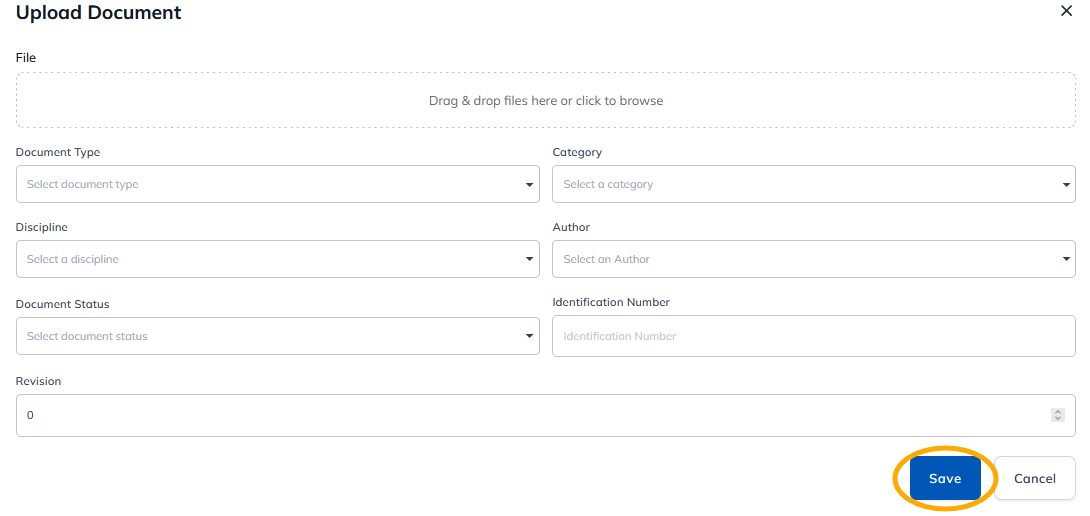
Step 3: Click on 'Choose file' to select the file to be uploaded, fill in the metadata and click on 'Save'.
- Document type Select the document type from the drop-down list.
- The author of the document must be one of your sharemundo links® contacts/connections.
- Category : Select the document category from the drop-down list.
- Discipline : Select the document's subject area from the drop-down list.
- Author select the document author from the drop-down list.
- The author of the document must be one of your sharemundo links® contacts/connections.
- Document status Select status from drop-down list.
- Identification number: enter the document reference.
- Revision: Enter the revision number for the document.
Step 4: Select the document(s) you've just uploaded and wish to link, and click on 'Confirm'.
Step 5: Don't forget to save your changes.