This feature is common to all sharemundo links® solutions.
Notes:
- Only company administrators (and project managers if you have a sharemundo links® solution that includes project management) can access all timesheets for all company employees as well as those pending approval.
- Users without administrative rights only have access to a preview of their own timesheets. If you do not have these advanced rights, please click here if you would like more details on your timesheet preview.
Etape 1 : Allez à la section ‘Suivi des heures’ depuis le menu de navigation coté gestion d’entreprise(section ‘Portail RH’).
Etape 2 : Par défaut, le tableau du menu ‘Suivi des heures’ vous donne l’aperçu des relevés d’heures que vous devez approuver ou rejeter (pour l’administrateur de l’entreprise et les chefs de projet si vous possédez une solution sharemundo links® comprenant la gestion de projet) :
- Vous pouvez afficher les relevés d’heures de tous les collaborateurs de l’entreprise en sélectionnant : ‘Afficher les fermés’.
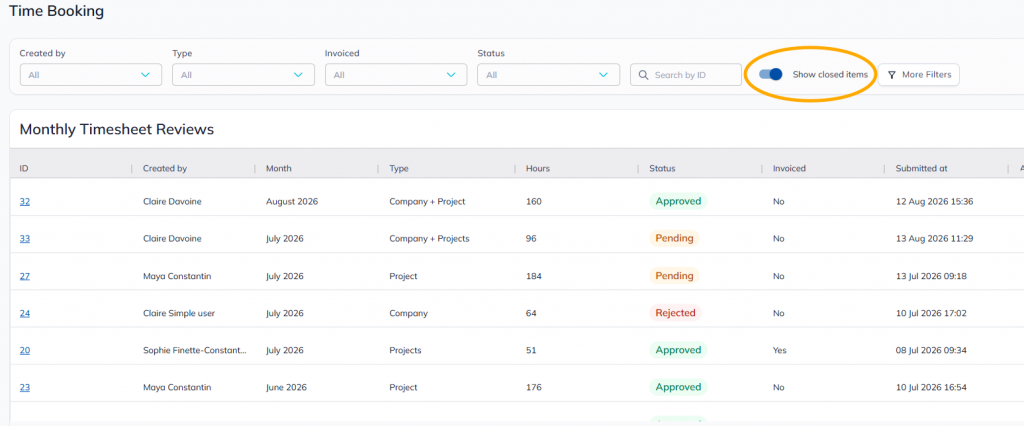
Step 3: You can sort each column by clicking on it. A second click will sort the information in reverse order.
Step 4: For the 'Follow-up statements' table, you can also :
- filter readings using the various fields available above the table;
- a filter on a project will give you an overview of all timesheets relating to that project.
- perform a statement search using the dedicated field.