This feature is common to all sharemundo links® solutions.
Etape 1 : Allez à la section ‘Financier’ , sous section ‘Gestion de la facturation’ depuis le menu de navigation.
Step 2: In the invoice tracking table, click on 'Send' in the action menu of the invoice you wish to send by e-mail.
Note : les captures ci-dessous concernent l’envoi de facture, mais le principe est exactement le même pour un avoir.
Etape 3 : Sélectionnez le pack de facture à envoyer, par exemple ‘facture uniquement’ et continuez vers le mail.
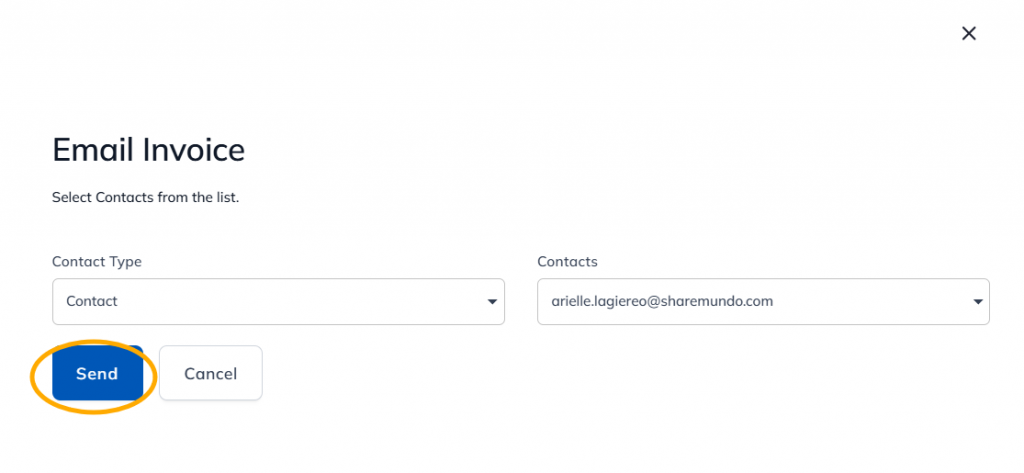
Etape 4 : Vous pouvez choisir d’envoyer à une entreprise ou un contact. Sélectionnez le ou les destinataires de la facture et cliquez sur ‘Envoyer’.
Step 4: A new e-mail containing a link to the invoice stored in sharemundo links® will open in your e-mail management application. All that's left to do is add further recipients if necessary, and/or modify the body of the email, if you wish, and click on 'Send'.
Etape 5 : Le destinataire du courrier électronique n’aura plus qu’à cliquer sur le lien reçu pour pouvoir télécharger la facture et ses éventuels attachements.