This feature is common to all sharemundo links® solutions.
Step 1: Go to the 'Documents' section in the left-hand menu ('Corporate Management' section for corporate documents or 'Project Management' section for project documents).
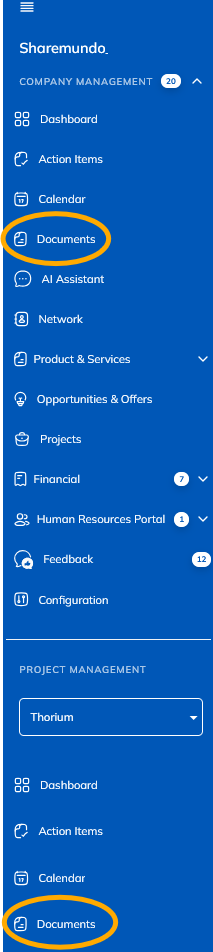
Notes:
- The screenshots below are for corporate documents, but the principles are the same for project documents. (if you have a sharemundo links® solution that includes project management).
- If your sharemundo links® solution includes project management, and you wish to edit document metadata in the 'Project documents' section for a specific project, you must first select the project in the left-hand navigation menu.
Step 2:
- In the 'Folder' tab, click on the edit icon on the line of the document whose metadata you wish to edit.
- In the 'List' tab, click on 'Edit' in the action menu corresponding to the document whose metadata you wish to edit.
Step 3: Make any necessary changes and click on 'Save'.