This feature is common to all sharemundo links® solutions.
Note This section is only accessible to the company administrator and users with administrative rights (administrator users).
Go to the 'Opportunities and Offers' section from the navigation menu.
Four tabs are available:
- The 'All' tab lists all your company's opportunities and offers, whatever their status.
- The 'Opportunities' tab lists all opportunities that have not yet been converted into an offer (or into a project if you have a sharemundo links® solution with project management).
- The 'Offers' tab lists all offers that have not yet been converted into projects (if you have a sharemundo links® solution with project management).
- The 'Projects' tab (only visible if you have a sharemundo links® solution with project management) lists all the projects that have been created from an opportunity or offer.
Note: for each tab, you can sort each column by clicking on it. A second click will sort the information in reverse order.
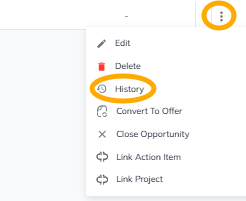
Note : pour chaque offre/opportunité, vous pouvez voir l’historique de ses modifications.
Cliquez sur ‘Historique’ dans le menu d’actions dans la dernière colonne du tableau (à l’extrême droite)