This feature is common to all sharemundo links® solutions.
Please note: Unless you are the company administrator, you can only modify actions assigned to you and those you have created. and those you have created, provided they are not closed.
Notes:
- The procedure below details how to modify the actions you've created. If you wish to modify an action assigned to you, click here.
- The steps are the same whether you use the list view or the action table view.
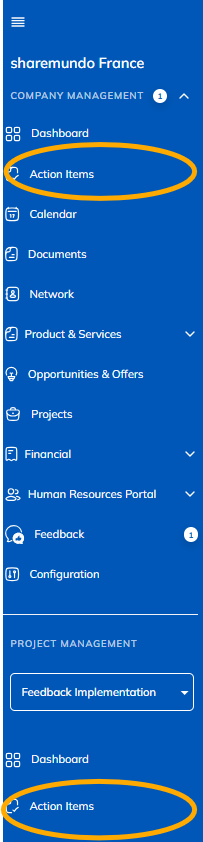
Step 1: Go to the 'Actions' section in the left-hand menu ('Company management' section for company actions, or 'Project management' section for project-related actions).
Notes:
- The screenshots below are for corporate actions, but the principles are the same for project actions. (if you have a sharemundo links® solution that includes project management).
- If your sharemundo links® solution includes project management, and if you wish to modify an action for a specific project, you must first select the project in the left-hand navigation menu.
Step 2: Click the action button for the action you want to edit and select “Edit.”
Note: in the 'Calendar' view, clicking on an action allows you to to modify it.
Note: You cannot modify actions that have already been completed.
Step 3: Edit the required fields and/or leave a comment. You can link documents, structures, and/or opportunities to the action.
Note: details of the fields are available in the section dedicated to creating actions.
Backup is automatic.