This feature is common to all sharemundo links® solutions.
Please note: Unless you are the company administrator, you can only modify actions assigned to you and those you have created. and those you have created, provided they are not closed.
Notes:
- The procedure below details how to modify the actions assigned to you. If you wish to modify an action you have created, click here.
- The steps are the same, whether you're using the list view, timeline view, or action table view.
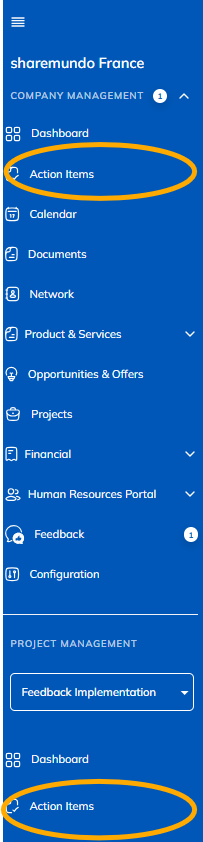
Step 1: Go to the 'Actions' section in the left-hand menu ('Company management' section for company actions, or 'Project management' section for project-related actions).
Notes:
- The screenshots below are for corporate actions, but the principles are the same for project actions. (if you have a sharemundo links® solution that includes project management).
- If your sharemundo links® solution includes project management, and if you wish to modify an action for a specific project, you must first select the project in the left-hand navigation menu.
Step 2: Click the action button for the action you want to edit and select “Edit.”
Note: in the 'Calendar' view, clicking on an action allows you to to modify it.
Step 3: Edit the “Status” field for the action. You can leave a comment. You can link documents, structures, and/or opportunities to the action, if necessary.
Etape 4 : N’oubliez pas d’enregistrer vos modifications.